
Dusty Robotics Review: Is the FieldPrinter Worth It?
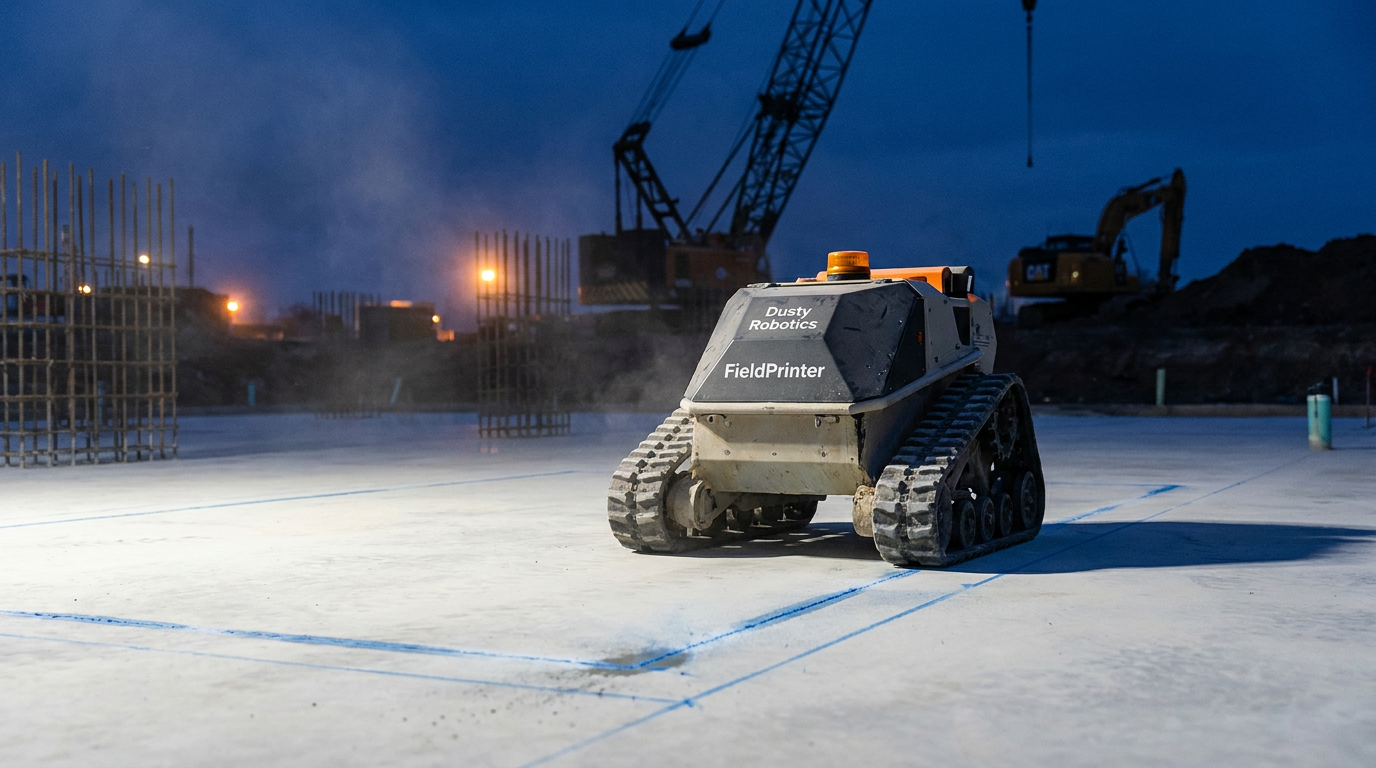
The Dusty Robotics FieldPrinter is worth it for large-scale commercial GCs who can keep it busy. This AI layout robot significantly cuts layout time and reduces errors, boosting productivity. However, its high cost and service model make it less practical for smaller firms or projects with infrequent layout needs.
The Old Way is Broken
For decades, jobsite layout has been a slow, manual grind. You hand a couple of your sharpest crew members a tape measure, a chalk line, and a set of rolled-up plans. For days, they snap lines, check corners, and hope everything matches the drawings. One mistake can cause a ripple effect of rework for every trade that follows.
It’s a process filled with chances for human error. A misread number, a bad angle, a chalk line snapped in the wrong spot—it all costs time and money. In a world of BIM models and digital precision, we’re still starting multi-million dollar projects with glorified string.
Dusty Robotics saw this problem and built a solution: the FieldPrinter. It's an AI-powered robot designed to take your digital plans and print them directly onto the jobsite floor at a 1:1 scale. No tape measures, no chalk, and a lot fewer chances for error. But does it live up to the hype?
What is the Dusty Robotics FieldPrinter?
The Dusty FieldPrinter is a rugged, autonomous robot that navigates a construction site and prints layout information from a BIM or CAD file. Think of it like a giant printer for your concrete slab. It can print:
- Wall locations (top and bottom plates)
- Mechanical, electrical, and plumbing (MEP) layouts
- Grid lines and control points
- Text labels, door swings, and clearance zones
- Any line or point data from your digital model
It’s designed to be operated by your existing crew, not a team of robotics experts. The goal is to turn the tedious, error-prone layout process into a fast, automated task that one person can manage.
How It Works on the Jobsite
The workflow is straightforward. First, you prep the floor, making sure it's clean and clear of debris. The robot works best on a smooth concrete slab.
- Upload the Plan: You upload your coordinated BIM or CAD file to Dusty's system. The file needs to be clean and contain the specific points and lines you want printed.
- Set Control Points: Onsite, you establish a few control points that are also in your digital model. The robot uses these points to orient itself and understand exactly where it is on the jobsite.
- Press Go: The operator uses a tablet to control the robot. Once oriented, the FieldPrinter gets to work, rolling across the slab and precisely spraying ink lines for every element in the layout file.
An operator walks with the robot to monitor progress and manage any jobsite obstacles. The robot is smart enough to navigate around columns and other common obstructions, printing what it can and logging anything it couldn't reach.
The Good: Speed and Pinpoint Accuracy
The two biggest selling points for the FieldPrinter are speed and accuracy. And this is where it really shines.
According to Dusty Robotics, their system can lay out a space up to five times faster than a traditional crew. On a large, complex floor plate like a hospital or data center, a layout that might take a three-person crew a full week could be done by one person and a robot in a day or two. This frees up your skilled labor to focus on other critical tasks.
Accuracy is the other game-changer. The FieldPrinter boasts an accuracy of 1/16th of an inch. This level of precision eliminates the tiny measurement errors that compound over a large area, leading to framing that's out of whack or MEP that doesn't fit. When every trade is building off the same, perfectly accurate set of lines, you get fewer clashes and less rework. This is a huge factor in improving overall jobsite operations.
This isn't just about saving time on layout. It's about preventing the costly delays that come from fixing layout mistakes down the line.
Act as a construction project manager. I need to create a simple Standard Operating Procedure (SOP) for my team to use the Dusty Robotics FieldPrinter on our jobsites. The SOP should be a checklist format and cover three phases: Pre-Layout, On-Site Execution, and Post-Layout QC. Make it clear and easy for a foreman or project engineer to follow. Include checks for slab condition, file preparation, control point verification, and a final walkthrough with trade partners.
The Catch: Cost and Logistics
This technology isn't cheap, and you don't actually buy the robot. Dusty Robotics operates on a Robot-as-a-Service (RaaS) model. You pay a subscription or a per-project fee for the robot, software, and support. This model lowers the upfront capital expense, but it’s a recurring operational cost you need to budget for.
Pricing isn't public, as it depends on the project size, duration, and level of support needed. But you can expect it to be a significant line item. The ROI comes from a reduction in labor hours and rework costs. If you can't keep the robot consistently busy on large, complex projects, the math might not work out.
There are also logistical hurdles:
- Surface Prep: The robot needs a clean, dry, and relatively smooth surface. Dusty floors, puddles, or major cracks can interfere with printing.
- File Prep: Your BIM/CAD files must be clean and properly coordinated. The robot prints what you tell it to. Garbage in, garbage out.
- Training: While designed to be user-friendly, there is a learning curve. A member of your team will need to be trained as the primary operator.
Who Should Use the FieldPrinter?
The Dusty FieldPrinter is not for every contractor. It's a specialized tool for a specific type of work.
It's a great fit for:
- Large-scale GCs: Companies building hospitals, data centers, airports, high-rise residential, or massive office buildings will see the biggest benefit.
- Complex Layouts: The more complex the floor plan (curved walls, dense MEP), the more time and potential errors you save.
- Tech-forward firms: Companies already deep into BIM and VDC will find it easier to integrate the FieldPrinter into their workflows.
It's probably not for:
- Small GCs or Residential Builders: The cost and scale are likely too much for smaller projects or custom homes.
- Simple Projects: If you're building a simple warehouse or a big-box retail store with straight lines, the benefits may not outweigh the cost compared to a small, efficient layout crew.
I am a General Contractor considering using the Dusty Robotics FieldPrinter for an upcoming 50,000 sq ft office build-out. Help me create a simple ROI calculation. Assume a 2-person manual layout crew costs $75/hour each and would take 80 hours. Assume the Dusty service costs a flat fee of $15,000 for this project and requires one operator at $75/hour for 20 hours. Also, factor in an estimated 5% reduction in rework costs on a $500,000 interior construction budget due to improved accuracy.
The Verdict: A Tool for the Big Leagues
So, is the Dusty Robotics FieldPrinter worth it? For the right company on the right project, absolutely.
It represents a major step forward in connecting digital models to physical construction. By automating the layout process, it saves a huge amount of time, drastically reduces human error, and prevents the cascade of problems that a bad layout can cause. For GCs working on large, complex projects, the ROI is clear: faster schedules, lower labor costs, and less rework.
However, it's a professional-grade tool with a professional-grade price tag. The RaaS model and the need for consistent, large-scale work mean it's not a fit for every contractor. If you’re a smaller firm or primarily handle straightforward projects, the tried-and-true chalk line and tape measure will remain your tools of choice for now.
The FieldPrinter is a glimpse into the future of the jobsite, where automation handles the repetitive tasks, freeing up human workers to solve the complex problems. It's not about replacing people; it's about making them more efficient.
Frequently asked questions
37 copy-paste prompts that save tradespeople 5+ hours a week. Plus one short email every Friday — no fluff.
More for general contractors

AI for General Contractors: A Builder's Playbook
AI for General Contractors comes down to using AI to do the slow stuff — quoting, paperwork, marketing, and customer follow-up — so you can stay on the too

How to Use AI for Construction Project Management
How to Use AI for Construction Project Management comes down to using AI to do the slow stuff — quoting, paperwork, marketing, and customer follow-up — so