
How AI Learns From Your Construction Photos
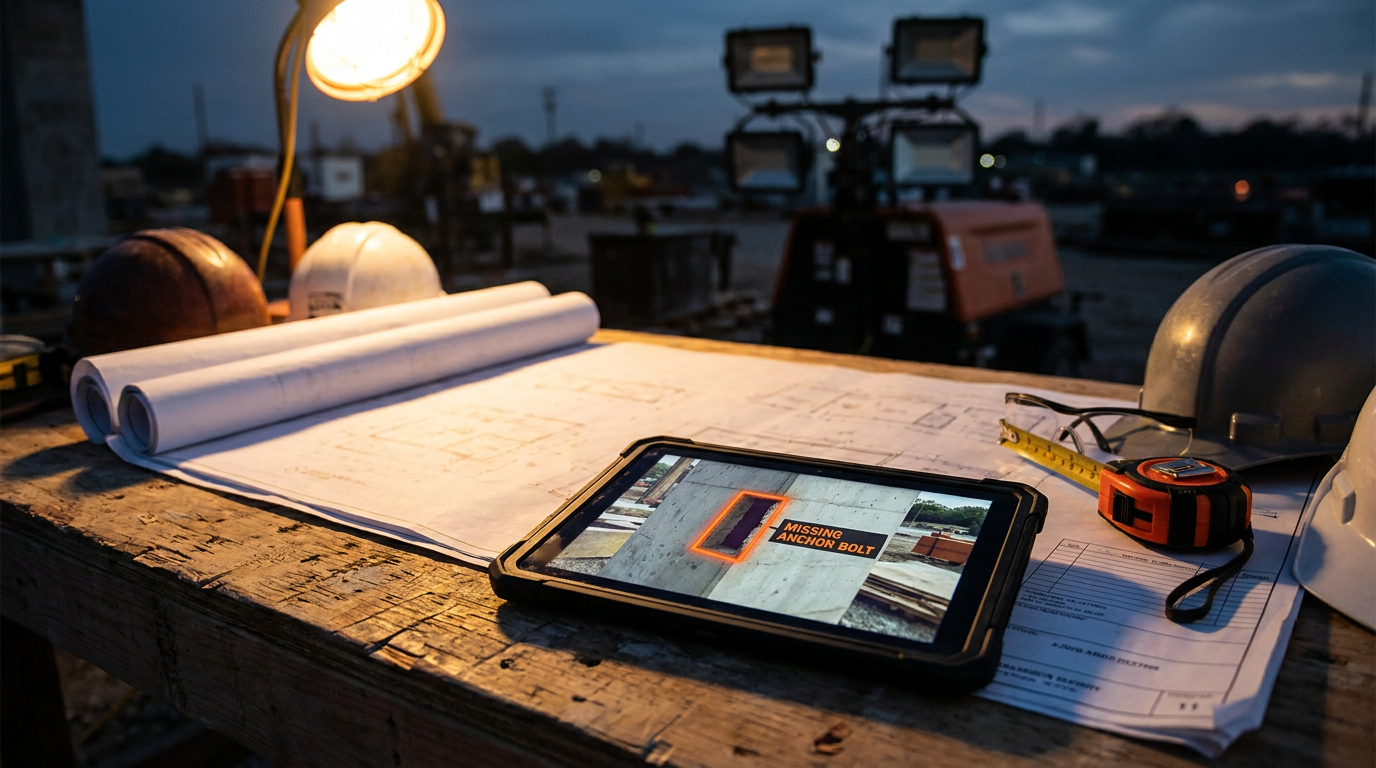
AI learns from construction photos by analyzing thousands of labeled images. This process, called computer vision, teaches the AI to recognize patterns, objects, and mistakes. It's like showing a rookie countless pictures of correct and incorrect work until they can spot the difference on their own, instantly.
You probably have thousands of photos on your phone or in a project folder. Progress shots, pre-pour inspections, safety audits. Most of the time, they just sit there, a digital pile of proof that work got done. But what if those photos could do more? What if they could spot a missing anchor bolt before the concrete truck even shows up?
That’s where Artificial Intelligence comes in. It’s not about robots taking over the jobsite. It’s about teaching a machine to see a jobsite the way an experienced superintendent does. Let's break down how it works, no tech jargon allowed.
What is Computer Vision, Anyway?
At its core, the technology that lets AI understand photos is called “computer vision.” Forget the fancy name. Think of it like training a new hire.
You wouldn’t just throw a greenhorn onto a site and expect them to know what a proper weld looks like. You’d show them. You’d point to a good one, then a bad one. You’d show them pictures of correctly installed rebar and pictures where it’s all wrong. You do this over and over until they can spot the difference themselves.
Computer vision works the exact same way. Engineers feed an AI model tens of thousands, or even millions, of construction photos. But they don't just dump them in. They label everything first. They teach the AI, one picture at a time, what it’s looking at.
The Training Process: From Photos to Intelligence
Turning a pile of jobsite photos into a smart tool involves a few key steps. It's a grind, but it's how the magic happens.
Step 1: Get the Pictures
First, you need a mountain of data. AI companies collect photos from every stage of a project. They get pictures of:
- Safety conditions: Workers wearing PPE, trench boxes, guardrails.
- Quality control: Concrete finishes, framing, waterproofing details.
- Progress: A site going from bare dirt to a finished building.
- Equipment: Lifts, excavators, scaffolding, and hand tools.
These photos come from everywhere: phones, drones, 360-degree cameras, and fixed cameras mounted on the site.
Step 2: Label Everything (The Hard Part)
This is the most important and time-consuming step. A human has to go through the images and tell the AI what’s in them. This is called “annotating” or “labeling.”
They draw digital boxes around things and give them a name. For example:
- Draw a box around a person’s head and label it “hard_hat.”
- Draw a box around their chest and label it “safety_vest.”
- Draw a box around an empty anchor sleeve and label it “missing_anchor_bolt.”
- Trace the outline of a fresh concrete pour and label it “slab_on_grade.”
The more detailed the labels, the smarter the AI becomes. It learns to tell the difference between a worker with a hard hat and one without. It learns what a clean worksite looks like versus one with trip hazards everywhere.
Step 3: Train the Machine
Once the images are labeled, they are fed into an AI model. The model is essentially a complex algorithm that tries to find patterns. It looks at all the pictures labeled “hard_hat” and learns the common shapes, colors, and textures.
During training, the AI makes a guess: “I think this is a hard hat.” The algorithm then checks the human-made label. If the AI was right, it reinforces that pattern. If it was wrong, it adjusts its internal logic and tries again. This process is repeated millions of times until the AI’s guesses are consistently accurate.
Step 4: Test and Improve
Finally, the trained AI is tested on a new set of photos it has never seen before. This shows how well it actually learned. If it can correctly identify hard hats, safety violations, or construction stages in new images, it's ready for the field. Companies like Procore and Autodesk are constantly refining their models with new data to make them even more accurate.
How You Can Use This Today
You don’t need to build your own AI model to try this out. General AI tools like ChatGPT-4o and Google's Gemini can now analyze images. They haven't been trained specifically on construction like the pro software, but they can still give you a taste of what’s possible.
Next time you're on site, snap a photo and try one of these prompts.
Analyze this construction site photo. Act as a safety inspector. Identify all visible workers and list whether they are wearing proper Personal Protective Equipment (PPE), including hard hats, high-visibility vests, and safety glasses. Also, list any potential environmental hazards like trip hazards, unguarded edges, or improperly stored materials.
This can give you a quick, unbiased second look at your site's safety.
Review this image of a building interior under construction. Based on the visible evidence, describe the current stage of construction. List the completed tasks (e.g., framing, electrical rough-in, drywall hung) and identify the likely next steps in the construction sequence for this area.
Use this to get a simple summary you can send to a client or project manager.
You are a jobsite foreman. Look at this photo of our staging area. Create a simple inventory list of all visible construction tools, equipment, and bulk materials. For each item, give a rough count if possible.
This is useful for quick asset tracking on a large or messy site.
Real-World Impact on the Job
This technology is already changing how sites are managed. Here are a few ways it's being used:
- Safety First: AI automatically scans photos or video feeds for OSHA compliance. It can send an alert to the superintendent if it spots a worker on a roof without fall protection or a crew member without a hard hat. This helps prevent accidents before they happen.
- Quality Control: Instead of walking every inch of a job, a drone can fly the site and an AI can flag potential issues—like foundation cracks, improper window flashing, or areas of the building that don't match the BIM model.
- Progress Tracking: AI can compare today's photos to yesterday's to automatically measure progress. It can tell you that 70% of the drywall is hung or that the steel erection is 50% complete, improving the accuracy of your jobsite management and scheduling.
The Road Ahead
AI photo analysis isn't perfect. Bad lighting, weird camera angles, and rain can still confuse it. And the biggest challenge is that it needs a massive amount of good, clean, labeled data to learn effectively.
But the technology is getting better at a rapid pace. The future isn't about replacing the superintendent's eye; it's about giving them superpowers. Imagine an AI that not only spots a problem but also automatically creates a punch list item, assigns it to the right sub, and tracks it to completion. That's where we're headed.
Your jobsite photos are more than just a record. They are a data source. AI is the tool that can finally unlock their value, helping you build safer, better, and faster.
Frequently asked questions
37 copy-paste prompts that save tradespeople 5+ hours a week. Plus one short email every Friday — no fluff.
More for explainers
What Is AI for Tradespeople? (Plain English Guide)
What Is AI for Tradespeople? (Plain English Guide) comes down to using AI to do the slow stuff — quoting, paperwork, marketing, and customer follow-up — so

Will AI Replace Electricians, Plumbers, and HVAC Techs?
Will AI Replace Electricians, Plumbers, and HVAC Techs? comes down to using AI to do the slow stuff — quoting, paperwork, marketing, and customer follow-up

How Much Does AI Cost for a Small Contractor?
How Much Does AI Cost for a Small Contractor? comes down to using AI to do the slow stuff — quoting, paperwork, marketing, and customer follow-up — so you