
Rabbit R1 vs. Humane AI Pin: Useful on a Jobsite?
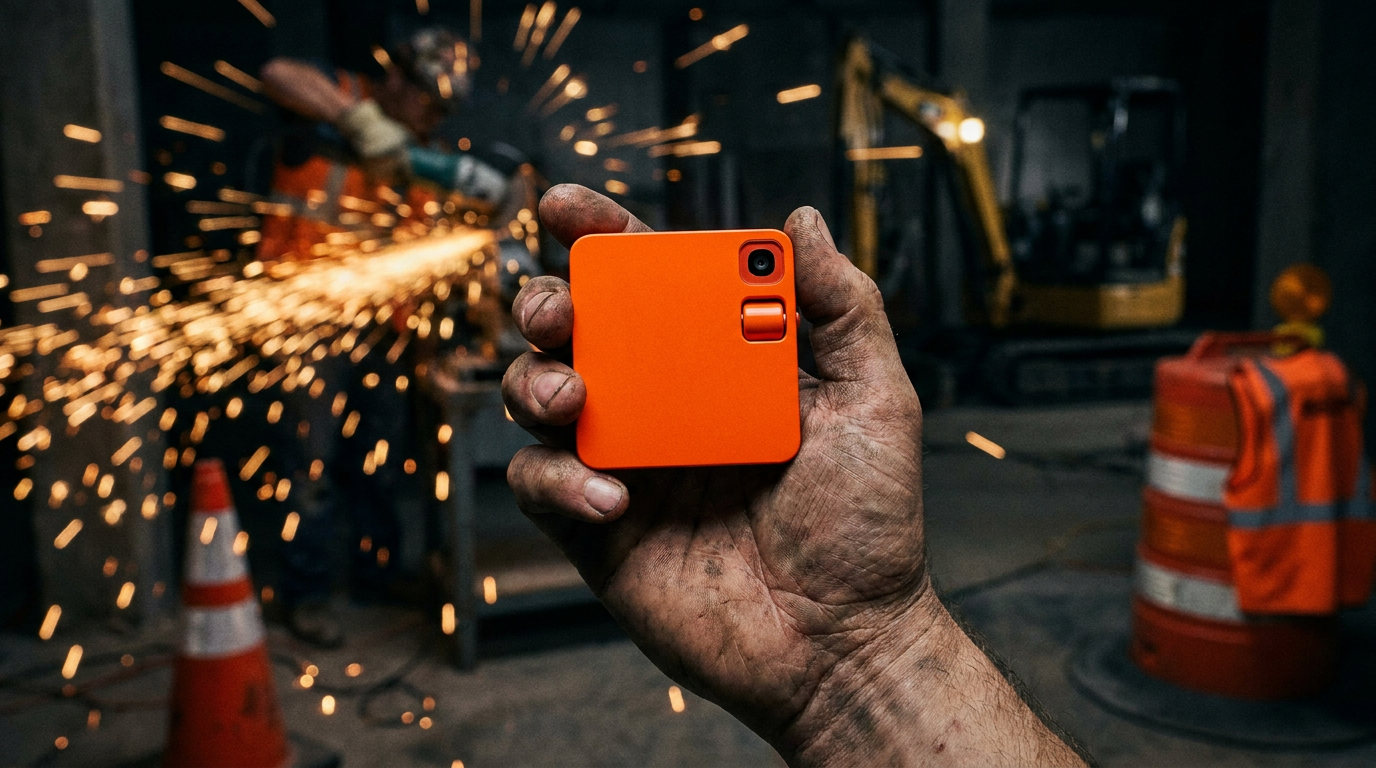
For contractors, neither the Rabbit R1 nor the Humane AI Pin is truly jobsite-ready. The Rabbit R1's lower price and physical screen give it a slight edge for quick lookups. However, both devices lack the durability, battery life, and reliable connectivity needed for a demanding construction environment.
Rabbit R1 vs. Humane AI Pin: Is This Sci-Fi Crap Useful on a Jobsite?
Every few months, some new gadget comes out of Silicon Valley promising to change everything. This year, it's the Rabbit R1 and the Humane AI Pin. They're small, AI-powered devices that are supposed to free you from your smartphone. But we’re not in an office. We’re on jobsites with dust, noise, and deadlines.
The real question is, can either of these things actually help a contractor get work done? Or are they just expensive toys that will break on day one? Let's cut through the hype and see if there's a real tool here or just another distraction.
What Are These Things, Anyway?
Before we can decide if they're useful, let's get a straight answer on what they are.
Humane AI Pin: This is a small, square pin that magnetically clips to your shirt or vest. It has no screen. Instead, it uses a laser to project information onto your hand. You talk to it, and it talks back. You control it with voice commands and hand gestures. It costs $699 plus a $24 monthly subscription for a phone number and data.
Rabbit R1: This is a small, bright orange square that fits in your palm. It has a small touchscreen, a scroll wheel, a camera, and a push-to-talk button. It’s designed to be a standalone AI assistant you talk to. It costs a one-time fee of $199, though you'll need a separate data plan or Wi-Fi for it to work.
Both are trying to be a new kind of computer, one that uses AI to understand what you want and just do it, without you needing to open apps.
The Rabbit R1 on the Jobsite
The R1 is the cheaper and simpler of the two. You hold it and press a button to talk, kind of like a walkie-talkie. This feels more natural than waving your hand around.
The Good:
- Low Cost: At $199, it's a much smaller risk than the AI Pin. If it falls off a ladder, you're not out 700 bucks.
- Has a Screen: A small screen is better than no screen. You can see the answer to your question, which is critical if you can't hear the response over a generator.
- Simple Controls: A push-to-talk button is straightforward. It’s less likely to get confused by accident than a gesture.
The Bad:
- Durability: This is the biggest problem. It's a plastic box made for a coffee shop, not a construction site. It has no IP rating for dust or water resistance. A little rain or a cloud of drywall dust could kill it.
- Two-Handed Use: It's not a hands-free device. You have to hold it to use it, which means you have one less hand to hold a tool, a tape measure, or a 2x4.
- Battery Life: Early reviews show the battery life is not great. It might not last a full 8-hour day of use.
The Humane AI Pin on the Jobsite
The AI Pin's main selling point is that it's hands-free. For a trade worker, that sounds great. But the reality is more complicated.
The Good:
- Hands-Free Idea: The concept is perfect for the trades. Being able to ask a question while you're wiring an outlet or holding a piece of pipe in place is the dream.
- It's on Your Body: Clipping it to a safety vest means it's always with you and you're less likely to set it down and lose it.
The Bad:
- High Cost & Subscription: At $699 plus a $24 monthly fee, this thing needs to do real work to justify its cost. Right now, it doesn't.
- Laser Projector: The laser that projects onto your hand is a gimmick. It's almost impossible to see in bright sunlight. On a roof or an open-air jobsite, it's useless.
- Gets Hot: The device runs hot when you use it for more than a few minutes. Having a hot metal square on your chest all day is not ideal.
- Gesture Controls: You have to use specific hand gestures to control it. This won't work with gloves on, and it's clumsy even with bare hands. Imagine trying to get the right angle on your palm while balancing on a joist.
Prompts to Test an AI Assistant
Before you spend money on a new gadget, test the AI you already have on your phone. See if Siri or Google Assistant can handle these real-world jobsite tasks. If they struggle, a new device won't do much better.
Here are a few prompts you can copy and paste to try today.
Calculate the materials needed for a 12-foot by 15-foot room with an 8-foot ceiling. I need the total number of 4x8 drywall sheets for the walls and ceiling, the number of 2.5 gallon buckets of mud, and the linear feet of tape, assuming a 5% waste factor.
Draft a professional but direct text message to a client named Mrs. Henderson. Tell her that the P-trap replacement under her sink is complete, but we discovered a slow leak on the main shutoff valve that needs attention. Ask when would be a good time tomorrow to come back and quote that repair.
Head-to-Head: Which Fails Less for a Contractor?
Let's be blunt. Neither of these tools is ready for prime time on a jobsite. But if you were forced to choose one, which one is less of a liability?
- Durability: Tie. Both fail. They are fragile consumer electronics. Your smartphone in an OtterBox or a similar rugged case is a much tougher tool.
- Usability: Rabbit R1 wins. A button and a screen, even small ones, are more practical than a laser you can't see and gestures that don't work with gloves.
- Cost: Rabbit R1 wins by a mile. It’s a one-time purchase that is less than a third of the AI Pin's upfront cost, with no mandatory monthly fee.
- Functionality: Tie. Both fail. They can't run the specific apps you rely on, like your project management software, supplier apps, or the photo gallery you use for documentation. They are assistants, not workhorses.
The Verdict: Stick to Your Smartphone
While the idea of a dedicated AI assistant is interesting, the Rabbit R1 and Humane AI Pin are first-generation products with major flaws for a contractor. They lack the ruggedness, reliability, and specific software integrations needed to be useful.
Your smartphone is still the best tech tool for the job. It’s more powerful, more versatile, and with a good case, much more durable. The voice assistants on your phone can already do many of the simple tasks these new devices promise. Learning how to use your phone more effectively is a better investment of your time and money. Check out our guides on jobsite operations to get more out of the tools you already own.
Maybe in a few years, a version of these devices will be built tough enough for our world. For now, leave the sci-fi gadgets in the box and grab a tool that works.
Frequently asked questions
37 copy-paste prompts that save tradespeople 5+ hours a week. Plus one short email every Friday — no fluff.
More for tool reviews

The 11 Best AI Apps for Electricians in 2026
The 11 Best AI Apps for Electricians in 2026 comes down to using AI to do the slow stuff — quoting, paperwork, marketing, and customer follow-up — so you c

Best AI Tools for Plumbing Companies (Tested)
Best AI Tools for Plumbing Companies (Tested) comes down to using AI to do the slow stuff — quoting, paperwork, marketing, and customer follow-up — so you
Best AI Dispatch Software for HVAC in 2026
Best AI Dispatch Software for HVAC in 2026 comes down to using AI to do the slow stuff — quoting, paperwork, marketing, and customer follow-up — so you can